
BeatConnect Technical Data Room
A no-code audio plugin builder enabling creators to design, build, and distribute professional VST3/AU plugins through a visual node-based editor. Plugins compile from C++ via JUCE and are delivered as signed, notarized installers for Windows and macOS.
React + WASM
Web Builder
JUCE C++
Plugin Runtime
VST3 / AU
Output Formats
Win + Mac
Cross-Platform
Product Overview
Understanding what BeatConnect is, who it serves, and the opportunity it represents.
What is BeatConnect?
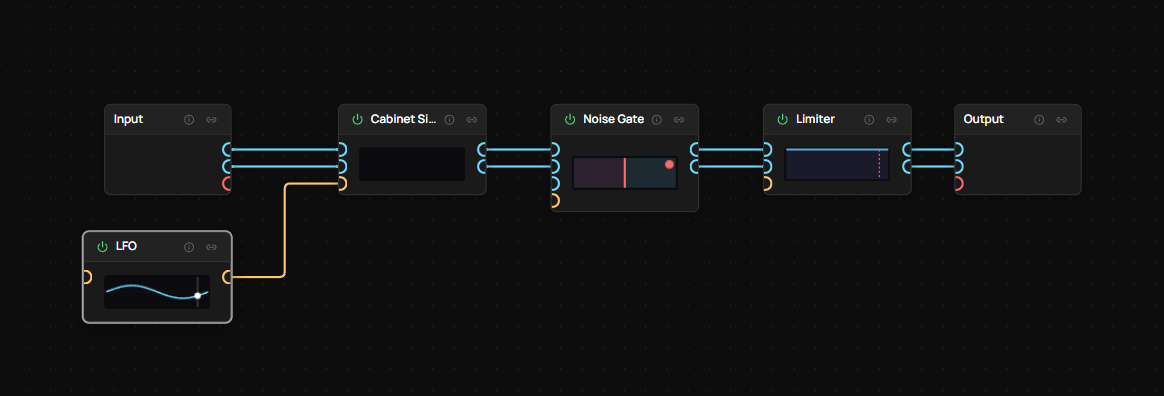
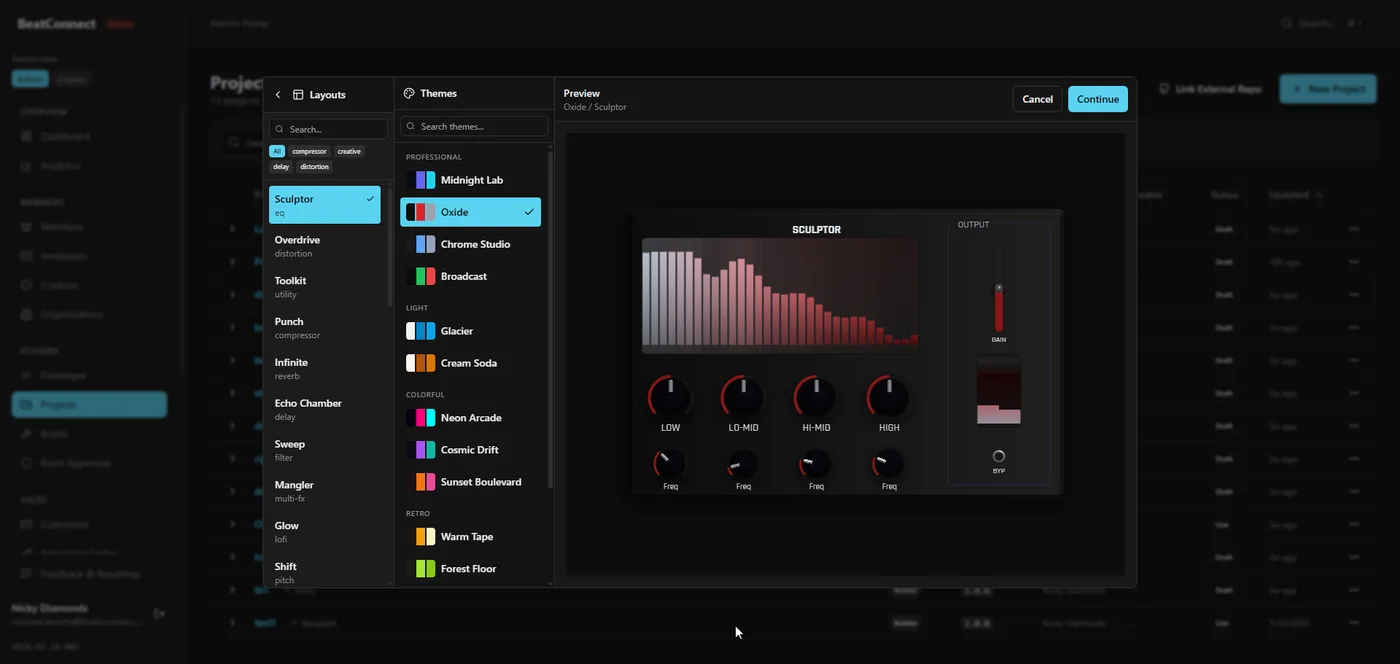
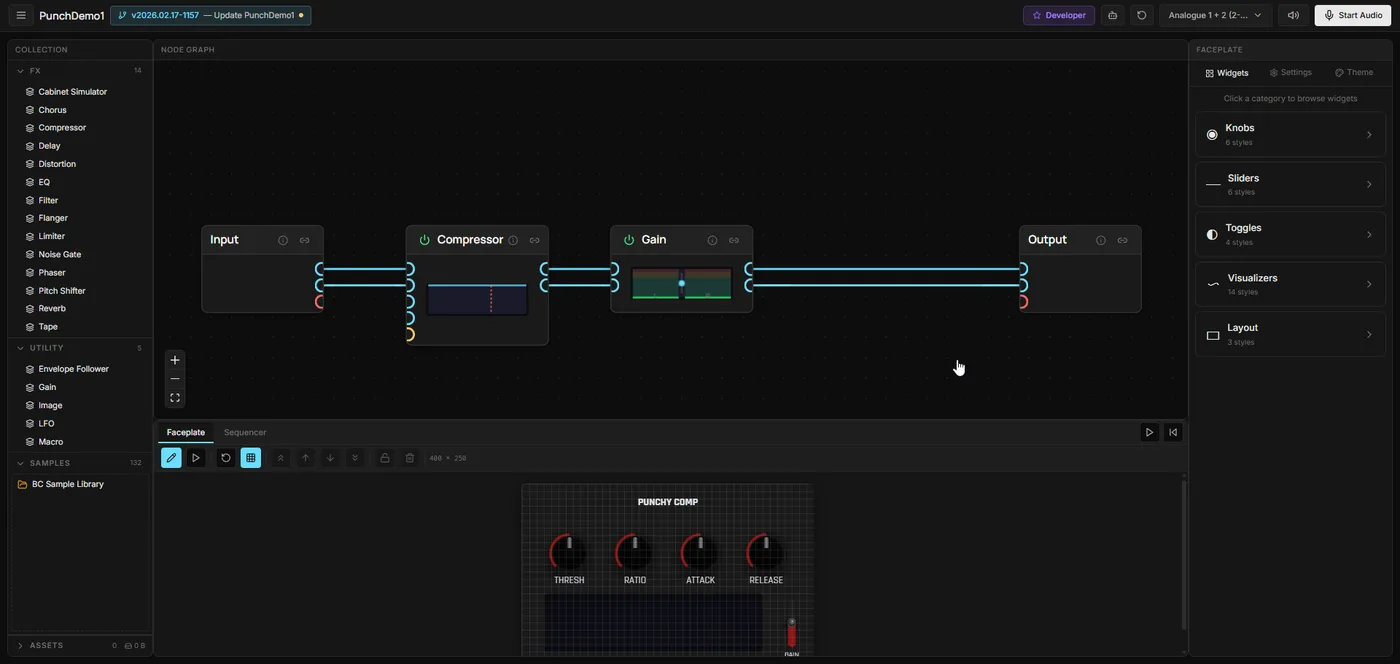
BeatConnect is a web-based platform that lets music producers and audio developers design professional audio plugins (VST3/AU) without writing code. Users build plugins visually using a drag-and-drop node editor, preview them in real-time in the browser, and compile them to native signed installers for Windows and macOS — all from a single web app.
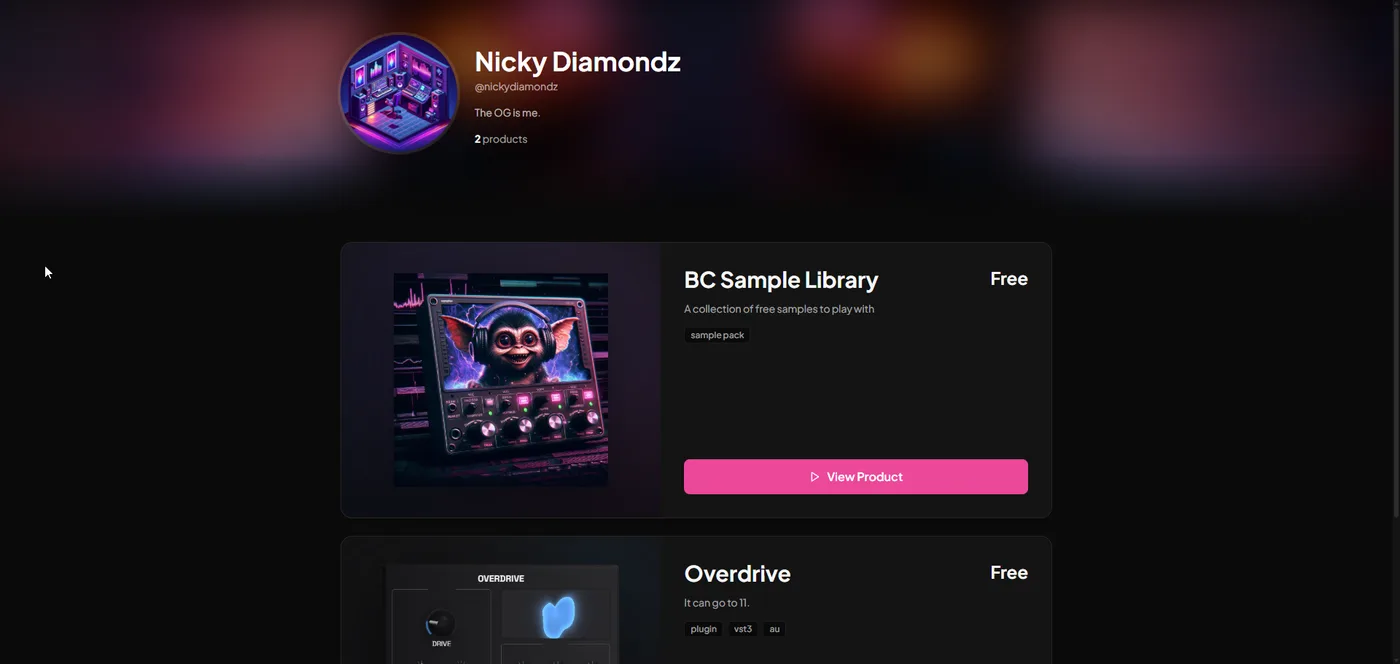
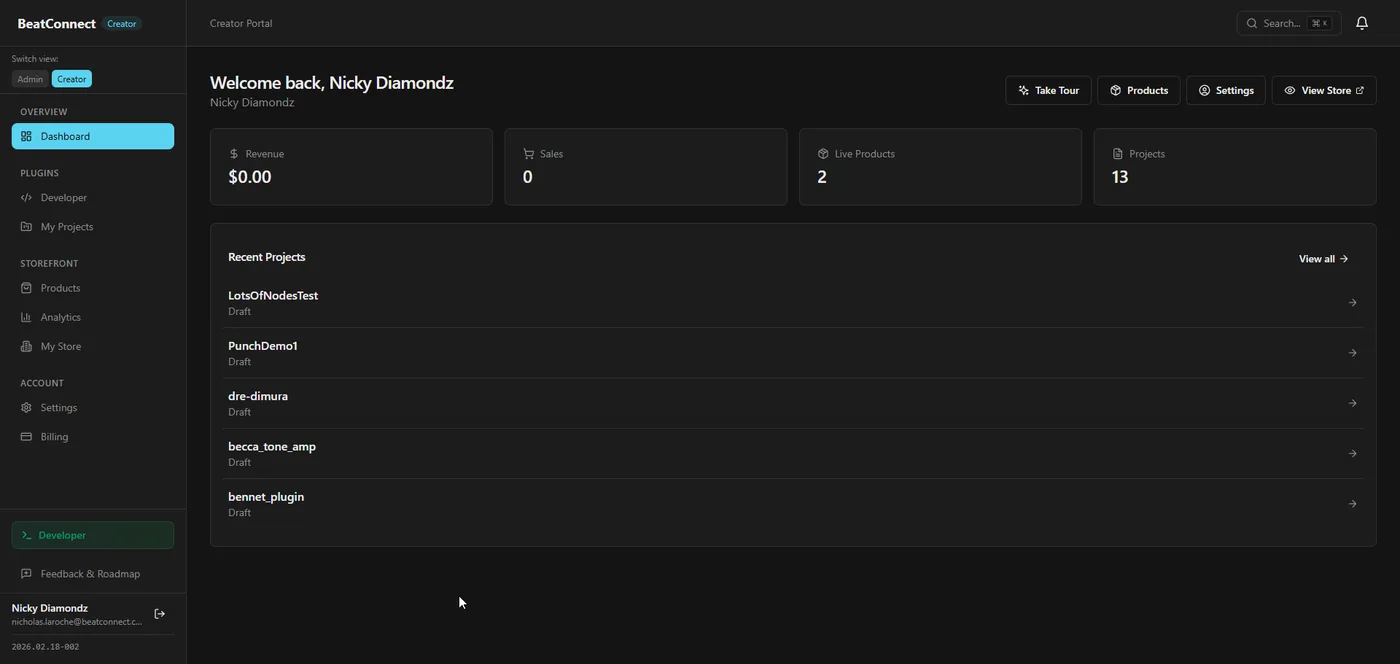
Beyond creation, the platform includes built-in distribution — each creator gets a branded storefront where they can sell their plugins and sample packs directly to customers, with integrated Stripe payments and automatic delivery.
Why This Matters
For Creators
Turn audio ideas into real, distributable plugins without C++ knowledge. Design, build, and sell — entirely in the browser. No dev tools, no compilers, no command line.
For the Market
Democratizes plugin development the way Shopify democratized e-commerce. Lowers the barrier from years of C++ expertise to hours of visual design.
For Acquirers
Unique technology moat: shared WASM/native C++ engine, automated build pipeline, and integrated marketplace. No direct competitor offers this end-to-end.
How It Works
The platform covers the entire lifecycle — from initial design to revenue. Here's the flow a creator goes through:
Step 1
Design
Build audio signal chains visually with a node editor, then design the plugin UI with the faceplate designer.
Step 2
Preview
Hear your plugin in real-time in the browser. The same C++ engine runs as WebAssembly.
Step 3
Build
One-click cloud compilation. Self-hosted runners build native VST3/AU for Windows and macOS in parallel.
Step 4
Distribute
Signed and notarized installers are uploaded to secure storage. Buyers get time-limited download links.
Step 5
Sell
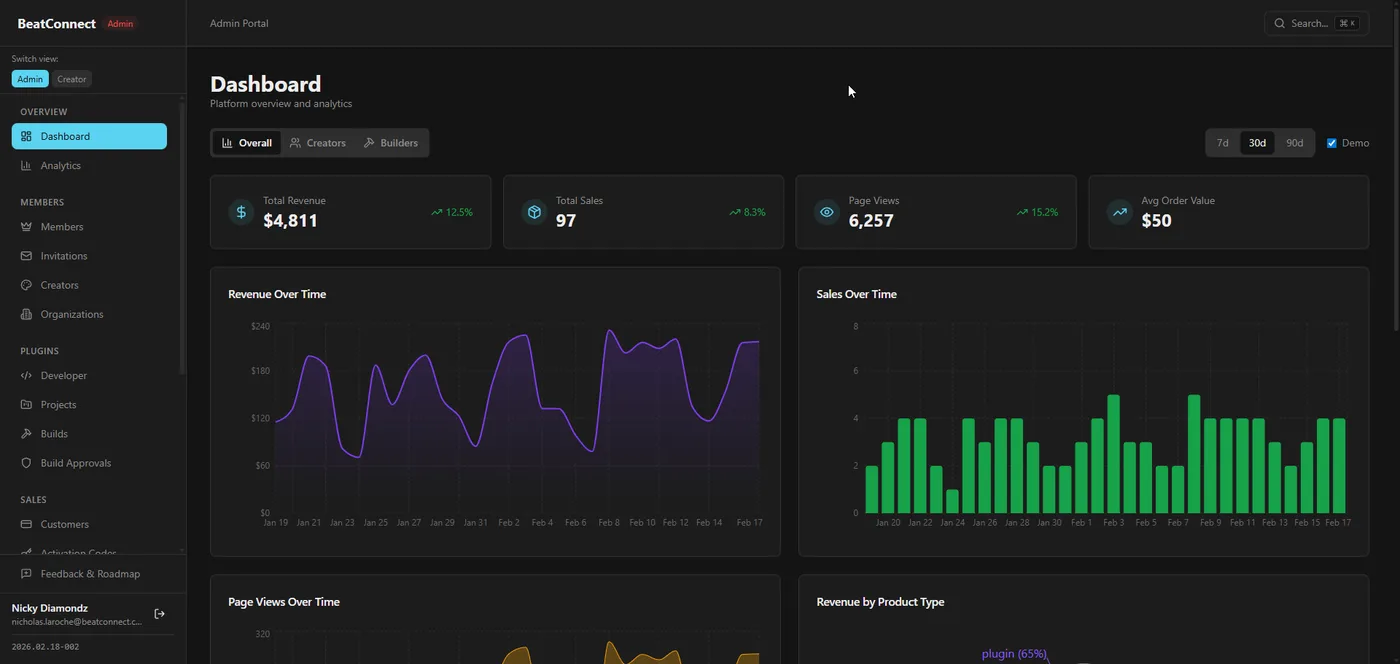
Branded creator storefronts with Stripe payments, analytics, and automatic payouts.
Who It's For
Primary Audience
- • Music producers who want to create custom audio tools without learning C++
- • Sound designers looking to package and sell their processing chains as standalone plugins
- • Audio brands wanting a white-label plugin creation and distribution platform
Secondary Audience
- • Audio developers wanting faster prototyping before committing to full C++ builds
- • Educational institutions teaching audio DSP concepts in an accessible environment
- • Content creators building branded audio tools for their community and audience
Competitive Landscape
There is no direct competitor offering this end-to-end pipeline. Existing tools cover pieces of the workflow but none combine visual design, real-time WASM preview, native compilation, code signing, and integrated distribution into a single platform.
Max/MSP, Pure Data
Visual audio tools but output is runtime-dependent, not native VST3/AU. No built-in distribution or monetization.
JUCE, iPlug2
Professional C++ frameworks but require deep programming expertise. No visual editor, no managed builds, no marketplace.
Splice, Plugin Boutique
Distribution platforms but no creation tools. Creators must build plugins elsewhere and upload finished products.
Rack Extensions (Reason)
Closed ecosystem plugin format. Not compatible with standard DAWs (VST3/AU). Limited distribution reach.
Plugin Builder
A browser-based visual editor for designing professional audio plugins without writing code.
Visual Node Editor
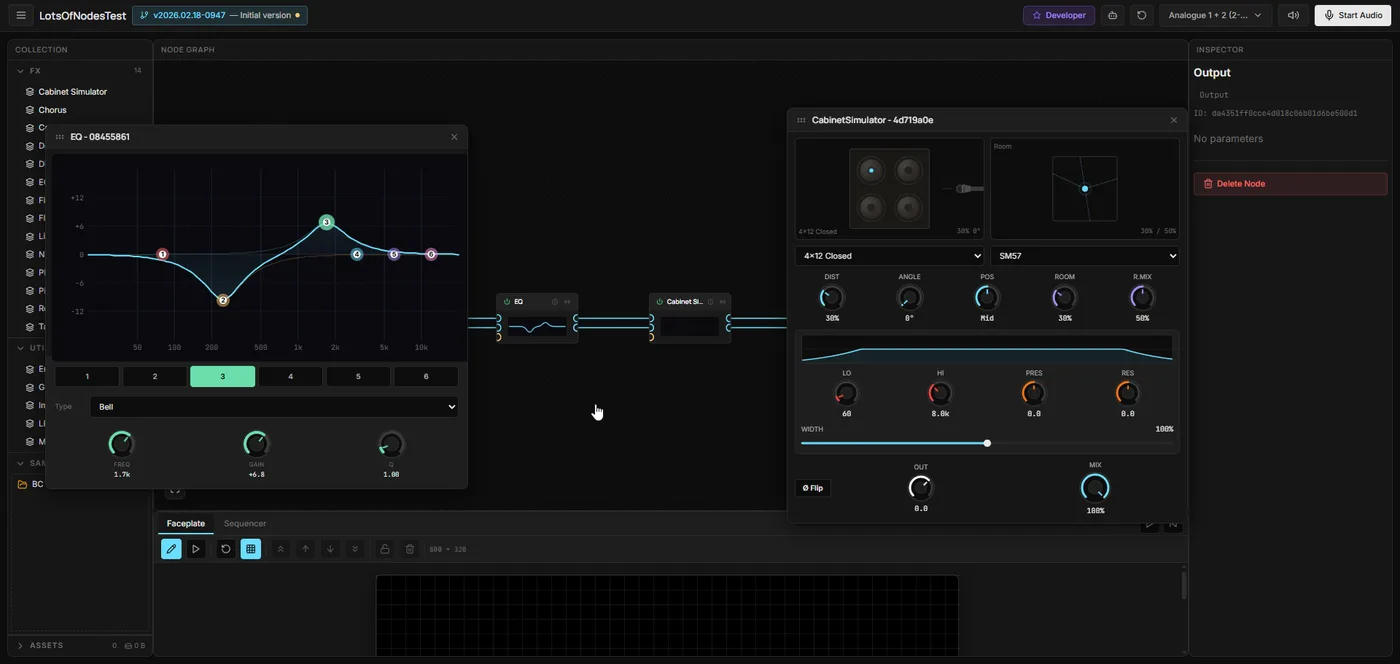
Drag-and-drop node graph for designing audio signal chains. Connect DSP nodes — filters, oscillators, delays, distortion, dynamics — to build complex audio effects visually.
- • 30+ built-in DSP node types
- • Real-time audio preview in the browser via WASM
- • Parameter mapping with custom ranges and curves
- • Undo/redo, copy/paste, node grouping
Faceplate Designer
Design the plugin's user interface with a visual editor. Choose from pre-built widgets — knobs, sliders, meters, XY pads — and style them with custom colors and layouts.
- • React-based UI compiled to a single HTML file
- • 14 GPU-accelerated visualizer types (Three.js)
- • Embedded in native plugin via JUCE WebView
- • Responsive layout system with breakpoints
Audio Engine
A shared C++17 audio engine that compiles to both WebAssembly (for in-browser preview) and native code (for the final plugin). The same DSP code runs in both environments, ensuring what you hear in the browser is exactly what ships in the plugin.
Browser Preview
C++ compiled to WASM via Emscripten. Real-time audio processing with Web Audio API.
Native Plugin
Same C++ compiled to VST3/AU via JUCE. Full native performance on Windows and macOS.
Shared Core
Graph processor, DSP nodes, sequencer, and sample engine are identical across both targets.
Build Pipeline
From visual design to signed, notarized installers — fully automated.
Design
Creator designs the plugin in the browser using the visual node editor and faceplate designer. The WASM audio engine provides real-time preview.
Submit Build
One-click build submission from the web app. The project graph, faceplate config, and asset references are serialized and sent to the backend.
Cloud Compilation
Backend triggers GitHub Actions via repository_dispatch. Self-hosted runners (Windows + macOS) compile the C++ plugin using CMake and JUCE in parallel.
Code Signing
Windows: Azure Trusted Signing. macOS: Apple Developer certificate + notarization. Both platforms produce signed installers (NSIS / productbuild).
Delivery
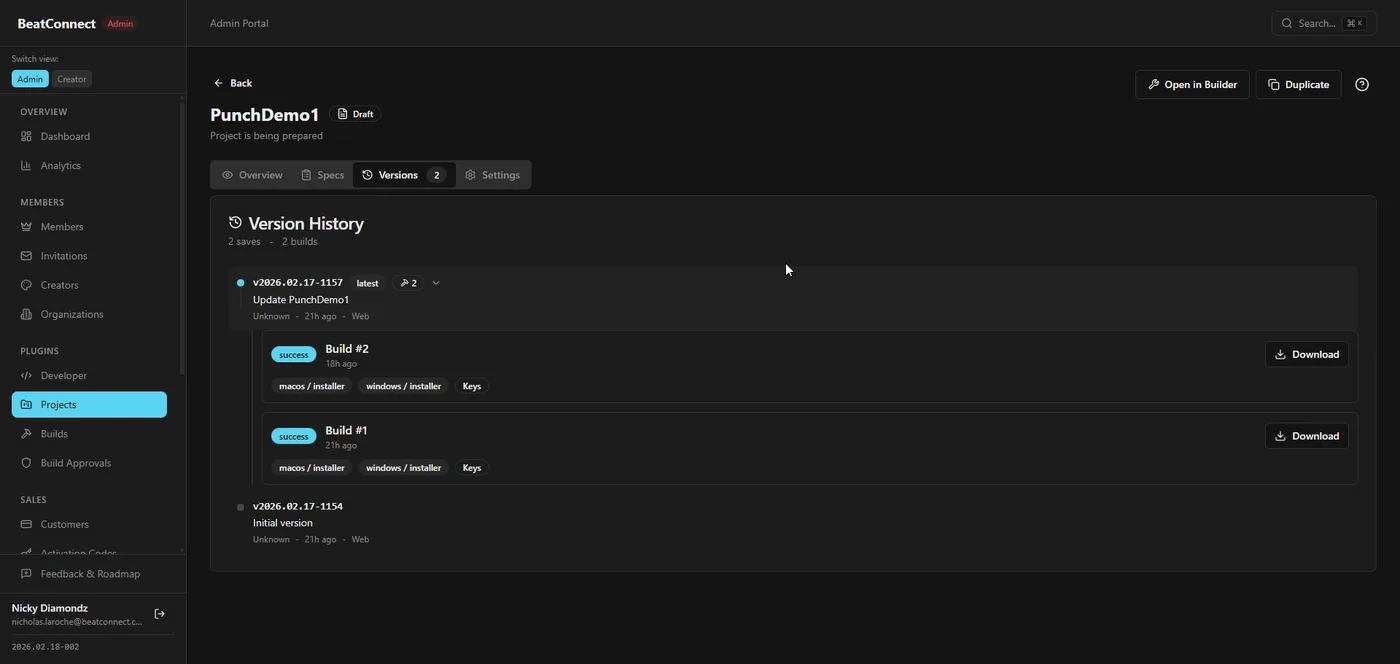
Signed artifacts are uploaded to Cloudflare R2. Download links are generated as time-limited signed URLs. Creator is notified when the build is ready.
Build Output
Windows
PluginName.vst3— VST3 plugin binaryPluginName-installer.exe— NSIS installer- Signed via Azure Trusted Signing
macOS
PluginName.component— AU pluginPluginName.vst3— VST3 pluginPluginName.pkg— productbuild installer- Signed + notarized via Apple Developer
Storefronts & Distribution
Built-in creator storefronts for selling plugins and sample packs directly to customers.
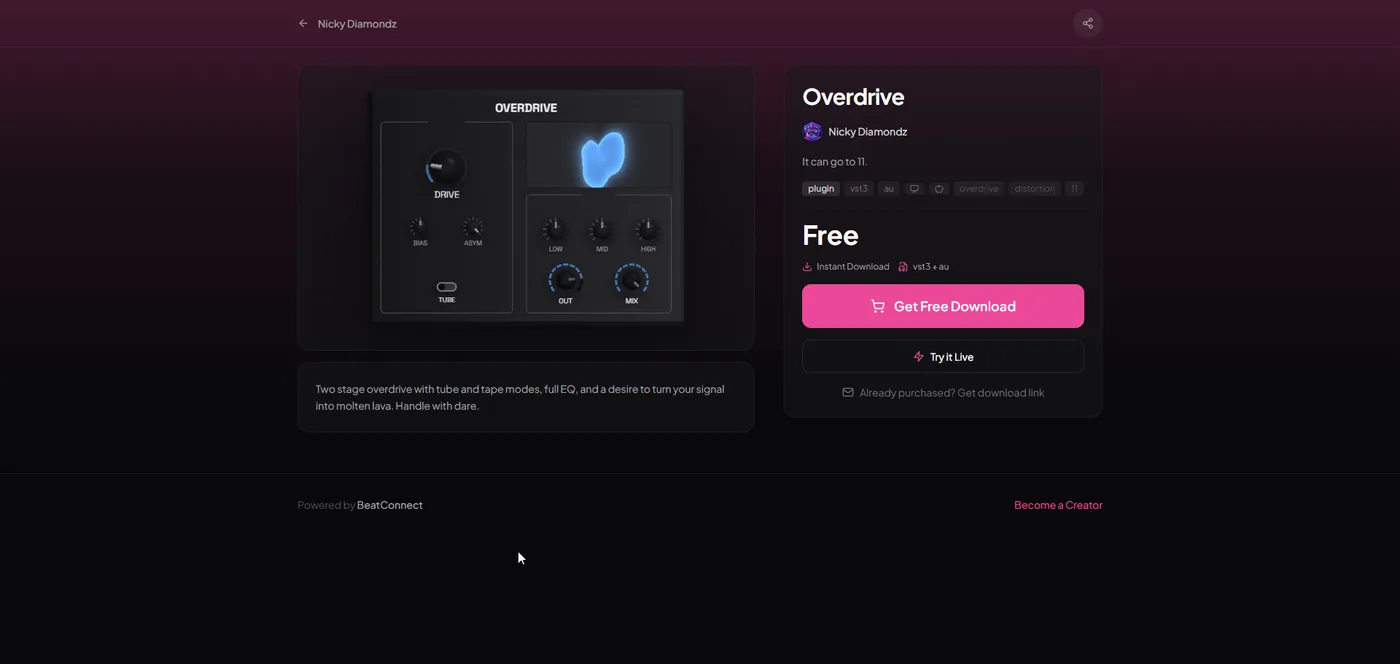
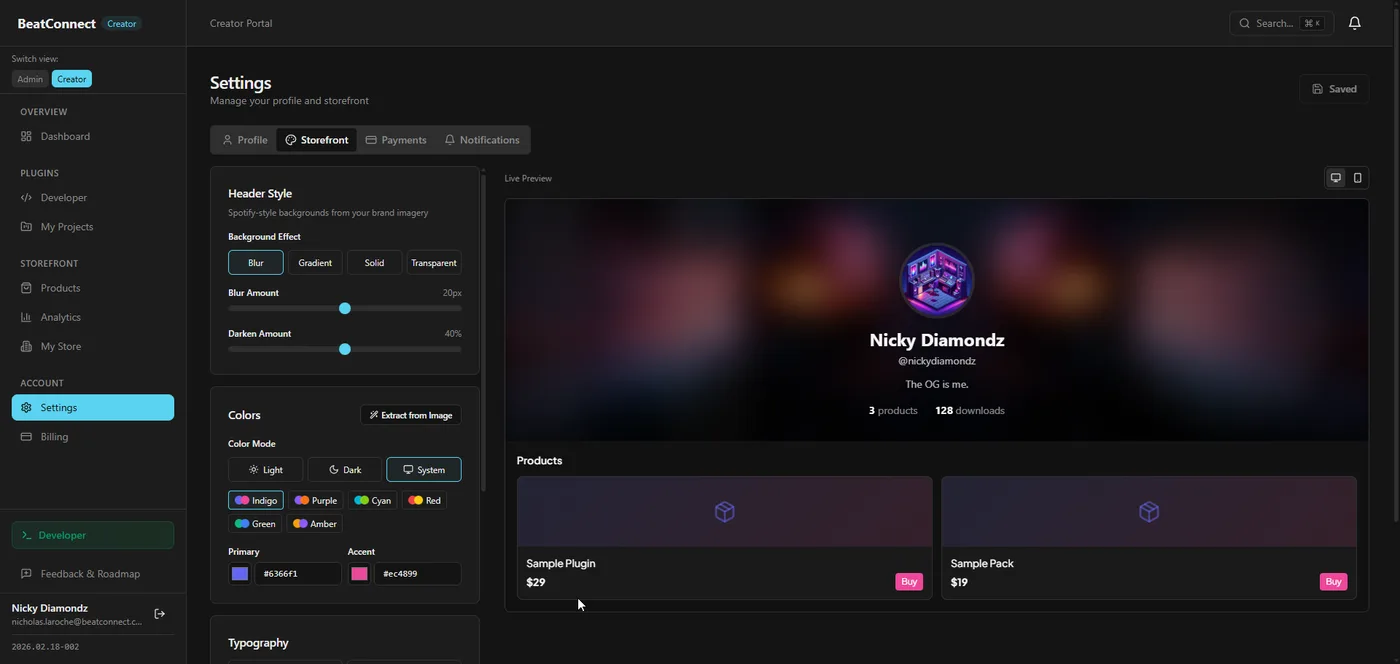
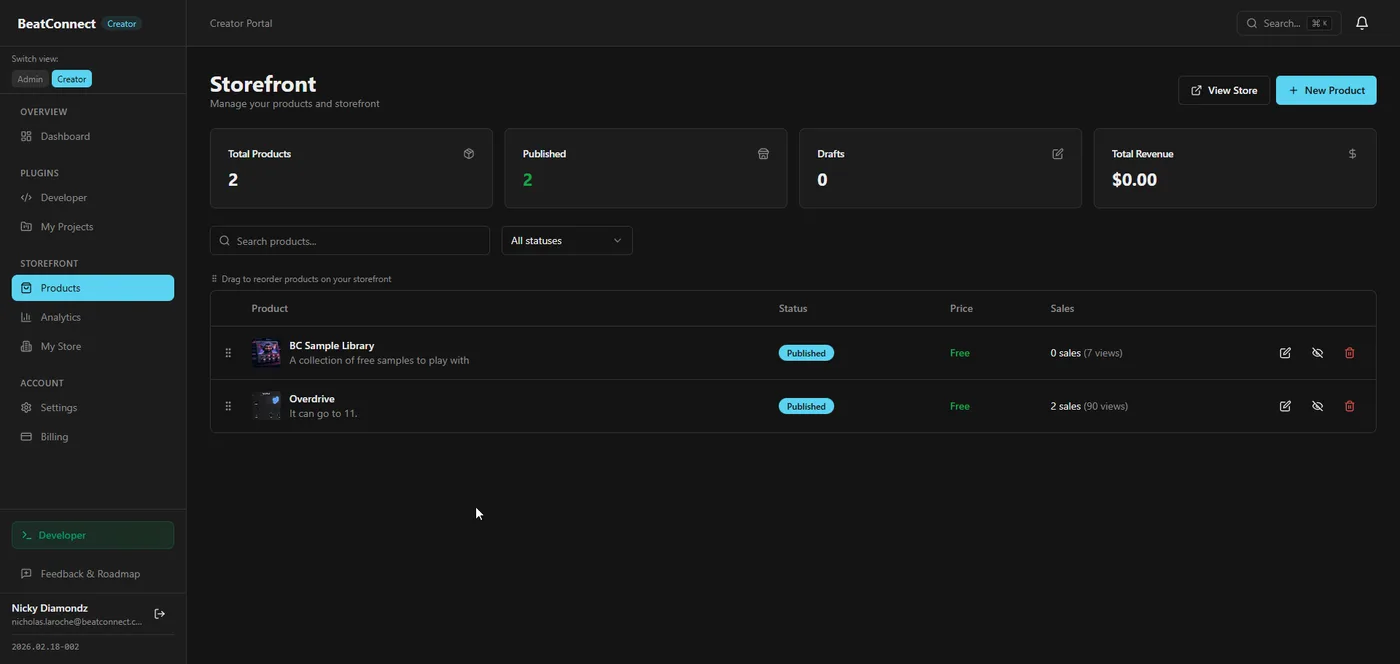
Creator Storefronts
Every creator gets a branded storefront at username.beatconnect.com. Customizable header, bio, social links, and product grid.
- • Custom subdomain with SSL
- • Blur/gradient header styles (like Spotify artist pages)
- • Product categories: plugins, sample packs, presets
- • Social links, bio, profile avatar
Monetization
Integrated payments via Stripe Connect. Creators set their own prices, platform takes a configurable commission. Automatic payouts.
- • Stripe Connect onboarding for creators
- • Secure checkout with Stripe Elements
- • Time-limited signed download URLs via R2
- • Sales analytics and revenue dashboard
Developer SDK
Extensibility layer for third-party developers to create custom nodes, widgets, and integrations.
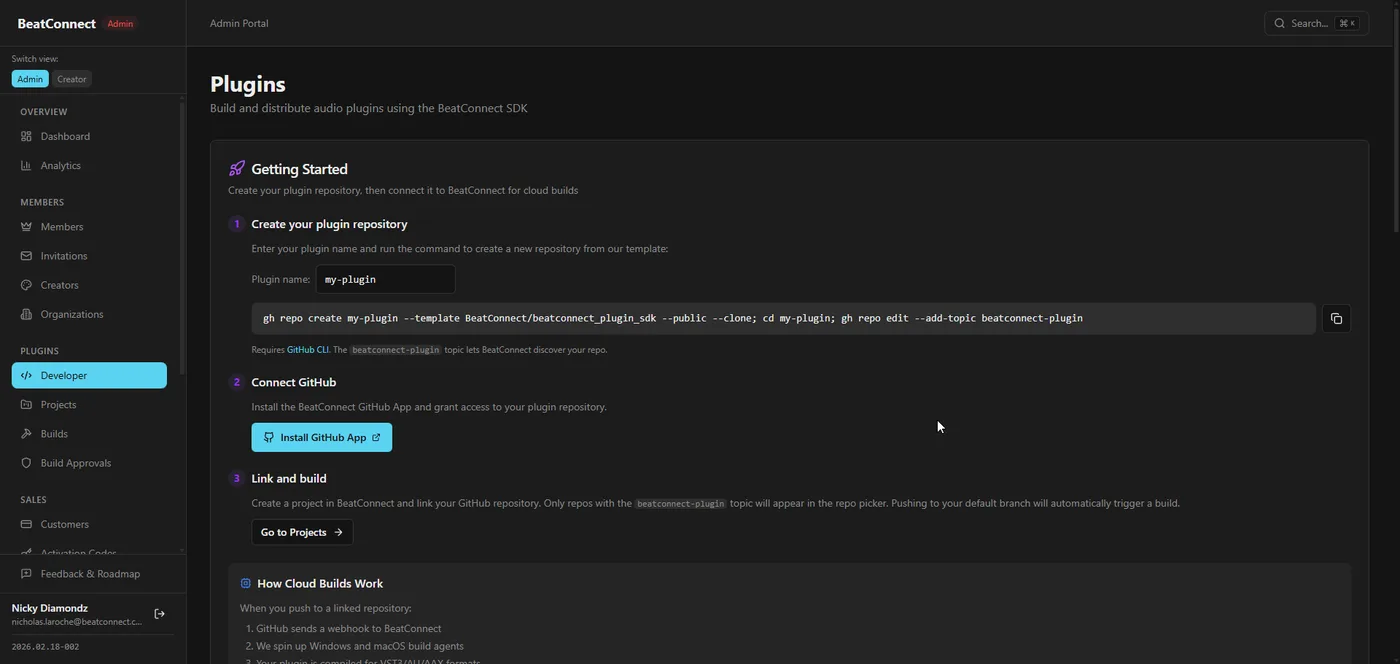
Custom DSP Nodes
Developers can create custom DSP processing nodes using C++ that compile to both WASM and native targets. A template system scaffolds new nodes with the correct interface. Nodes can expose parameters, define input/output ports, and include custom UI widgets.
Custom Faceplate Widgets
React-based widget components that can be used in the faceplate designer. Widgets receive parameter values and dispatch updates through a standardized bridge API. Includes access to the Three.js rendering context for custom visualizers.
SDK Documentation
Documentation scaffolding is in place covering node creation, widget development, and the parameter bridge API. The SDK has only been tested in local development and would need further work to be production-ready for external developers.
Demos & Media
Product screenshots and demo videos.
Screenshots
Demo Videos
Drop demo videos into techsale/public/videos/
Architecture
System architecture, data flow, CI/CD pipelines, and access control. Click Expand for full-screen interactive view.
System Architecture
Data Flow
CI/CD Pipelines
RBAC & Row Level Security
Tech Stack
Languages, frameworks, and dependencies.
Web Builder (admin/)
Core
-
React 18— UI framework -
Vite 5— Build tool -
TypeScript 5— Language -
Tailwind CSS 3— Styling -
Zustand 5— State (WASM bridge) -
React Router 6— Routing
Key Libraries
-
@xyflow/react 12— Node graph editor -
Three.js— 3D visualizer rendering -
Monaco Editor— Shader code editing -
Radix UI— Component primitives -
Recharts— Analytics charts -
JSZip— Client-side packaging
Audio Engine (audio-engine/ + shared/)
WASM Build (Browser)
-
C++17— Audio DSP code -
Emscripten 3.1.51— C++ to WASM -
CMake + Ninja— Build system
Native Build (Plugins)
-
JUCE 8.0.12— Plugin framework -
CMake— Build system -
MSVC / Clang— Compilers -
NSIS / productbuild— Installers
Backend (supabase/)
Supabase Platform
-
PostgreSQL 17— Primary database -
Row Level Security— Per-row auth -
Edge Functions (Deno)— ~43 serverless functions -
Supabase Auth— ES256 JWT
Key Edge Functions
-
projects— CRUD for plugin designs -
packages— Product distribution -
builds / builds-callback— Plugin compilation -
creator-portal / creator-stripe— Monetization -
stripe-webhook— Payment processing
Infrastructure & Services
Hosting & CDN
-
Cloudflare Pages— Static hosting -
Cloudflare Workers— Route proxy -
Cloudflare R2— Object storage (free egress) -
GitHub Actions— CI/CD + self-hosted runners
Third-Party APIs
-
Stripe— Payments + Connect -
SendGrid— Transactional email -
PostHog— Product analytics -
Sanity CMS— Content management -
Anthropic Claude— AI features -
Azure Trusted Signing— Windows code sign
IP Inventory
Intellectual property, domains, and proprietary technology.
Domains
beatconnect.com — Production beatconnect.xyz — Staging beatconnect.ca — Corporate Proprietary Technology
Visual DSP Editor to Native Plugin Pipeline
Complete pipeline from browser-based visual DSP design to compiled, signed VST3/AU installers. WASM engine provides real-time audio preview using the same C++ DSP code that ships in the native plugin.
Shared C++ Audio Engine (WASM + Native)
Single C++ codebase compiles to both WebAssembly (browser preview) and native (JUCE plugin). Graph processing, DSP nodes, sequencer, and sample engine are shared across both targets.
Faceplate System
React-based plugin UI compiled to a single HTML file, embedded in native JUCE WebView. 14 GPU-accelerated visualizer types, custom widgets, Three.js rendering.
Automated Build & Distribution
Self-hosted GitHub Actions runners (Win + Mac) compile on-demand, code sign (Azure Trusted Signing + Apple notarization), deliver via Cloudflare R2 signed URLs.
Key Licenses
Tracktion Engine Perpetual commercial licence owned by BeatConnect JUCE 8 Requires special end-user licence for "product that builds products" (see Limitations) React / Vite / Zustand MIT Supabase Apache 2.0 (client libs) / Hosted service @xyflow/react MIT Three.js / Emscripten MIT Patents & Trademarks — update with any pending registrations or applications.
Infrastructure
Hosting, deployment, and costs.
Hosting
| Service | Provider | Purpose | Tier |
|---|---|---|---|
| Database + Auth + API | Supabase | PostgreSQL, Edge Functions, Auth | Free → Pro ($25/mo) |
| Static Hosting | Cloudflare Pages | Admin app, marketing, landing | Free |
| Object Storage | Cloudflare R2 | Plugin artifacts, signed URL downloads | Free egress |
| Route Proxy | Cloudflare Workers | Domain routing | Free (100k/day) |
| CI/CD | GitHub Actions | Deploy pipelines + plugin builds | Free + Self-hosted |
| Build Runners | Self-hosted | Windows + macOS compilation | Hardware only |
Operating Costs
All services run on free tiers at low volume. At scale, the main cost is Supabase Pro ($25/mo).
Free Tier
- Supabase — 500MB DB, 50k MAU
- Cloudflare Pages — Unlimited bandwidth
- Cloudflare R2 — 10GB, free egress
- Workers — 100k requests/day
- GitHub Actions — 2,000 min/mo
Growth (~$25-50/mo)
- Supabase Pro — 8GB DB, 25k concurrent
- R2 — $0.015/GB/mo storage only
- SendGrid — Free up to 100 emails/day
- PostHog — Free up to 1M events/mo
- Stripe — 2.9% + $0.30 per tx
Deployment Process
Push to develop
Triggers staging deployment — DB migrations, edge functions, admin to staging CF Pages.
Merge to main
Production deploy — same pipeline with prod secrets, health checks (3 retries), AI release notes.
Plugin builds via repository_dispatch
Backend API triggers GitHub Actions on self-hosted runners. Parallel Win + Mac, code signed, uploaded to R2.
Secrets & Configuration
All secrets required to operate the platform. Names only.
GitHub Actions Secrets
Supabase
SUPABASE_ACCESS_TOKEN
SUPABASE_PROJECT_ID_STAGING
SUPABASE_PROJECT_ID_PRODUCTION
SUPABASE_DB_PASSWORD_STAGING
SUPABASE_DB_PASSWORD_PRODUCTION
STAGING_SUPABASE_URL
PROD_SUPABASE_URL
STAGING_SUPABASE_PUBLISHABLE_KEY
PROD_SUPABASE_PUBLISHABLE_KEY
Cloudflare
CLOUDFLARE_API_TOKEN
CLOUDFLARE_ACCOUNT_ID
Code Signing (Windows)
AZURE_TENANT_ID
AZURE_CLIENT_ID
AZURE_CLIENT_SECRET
AZURE_TRUSTED_SIGNING_ENDPOINT
AZURE_TRUSTED_SIGNING_ACCOUNT_NAME
AZURE_CERTIFICATE_PROFILE_NAME
Code Signing (macOS)
APPLE_CERTIFICATE_P12
APPLE_CERTIFICATE_PASSWORD
APPLE_NOTARIZATION_PASSWORD
Build System
BUILDS_WEBHOOK_SECRET
Supabase Edge Function Secrets
Storage (R2)
R2_ENDPOINT
R2_ACCESS_KEY_ID
R2_SECRET_ACCESS_KEY
R2_BUCKET_NAME
Payments
STRIPE_SECRET_KEY
STRIPE_WEBHOOK_SECRET
Email & Integrations
SENDGRID_API_KEY
SANITY_API_TOKEN
ANTHROPIC_API_KEY
Analytics
POSTHOG_PERSONAL_API_KEY
POSTHOG_API_KEY
Notifications
SLACK_BOT_TOKEN
SLACK_CHANNEL_CASH
SLACK_CHANNEL_STATS
Platform
FRONTEND_URL
DEPLOY_SECRET
CRON_SECRET
PLUGGY_INTERNAL_SECRET
GITHUB_ORG_WEBHOOK_SECRET
ENVIRONMENT
Supabase-Managed (Not in CI/CD)
GitHub Build Integration
GH_PAT
GH_OWNER
GH_REPO
BUILDS_WEBHOOK_SECRET
Downloads
DOWNLOAD_LINK_SECRET
DOWNLOAD_LINK_EXPIRY_DAYS
Frontend Environment Variables (Vite)
Client-Side Config
VITE_SUPABASE_URL
VITE_SUPABASE_PUBLISHABLE_KEY
VITE_STOREFRONT_URL
VITE_POSTHOG_KEY
VITE_POSTHOG_HOST
Integration
Options for deploying the platform standalone or integrating into an existing backend, and build infrastructure requirements.
Standalone Deployment
The platform can run as a fully independent product with minimal configuration changes. The core services (Supabase, Cloudflare, Stripe) are all managed/hosted and require account setup but no custom infrastructure.
What you'd need to set up
- • New Supabase project — run existing migrations to recreate schema + RLS policies
- • Cloudflare account — Pages for hosting, R2 for storage, Workers for routing
- • Stripe account with Connect enabled for creator payouts
- • Domain and DNS configuration
- • GitHub repository with Actions secrets configured
- • Environment variables and edge function secrets (see Secrets & Config section)
Custom Backend Integration
If integrating into an existing backend, the Supabase layer can be replaced. The key integration points are:
- • Auth — Replace Supabase Auth with your own JWT provider. The frontend uses a Supabase client that can be swapped.
- • Database — PostgreSQL schema and RLS policies can be migrated to any Postgres instance. Edge functions would need to be rewritten as your backend's API layer.
- • Storage — R2 is S3-compatible. Swap the endpoint and credentials to point at any S3-compatible store.
- • Builds — The GitHub Actions build pipeline is triggered via repository_dispatch. Any backend that can call the GitHub API can trigger builds.
- • Payments — Stripe integration is in the edge functions. Can be moved to any server-side environment.
Build Infrastructure Setup
Getting the cloud build pipeline operational on new infrastructure requires some specific setup work:
Apple Code Signing
- New Apple Developer account or transfer
- Generate Developer ID Application certificate
- Export .p12 and configure in CI secrets
- Set up notarization credentials (app-specific password)
- Test notarization flow end-to-end
Windows Code Signing
- Azure Trusted Signing account setup
- Certificate profile creation
- Service principal with signing permissions
- Configure tenant/client/secret in CI
Self-Hosted Runners
Plugin builds require self-hosted GitHub Actions runners with compilers installed — MSVC on Windows, Xcode/Clang on macOS. The runners need CMake, Ninja, and the JUCE framework. Current setup uses dedicated machines, but could be moved to cloud VMs (e.g. EC2 Mac instances, Azure Windows VMs).
Limitations & Known Issues
Current limitations and areas for improvement.
FX plugins only
The plugin builder currently supports FX (audio effect) plugins only. Synth support could be added with relatively low effort. Samplers and drum machines would require more significant work.
Minor UI/UX bugs in the node editor
Some visualizer nodes do not update their colour correctly after parameter changes. Other small cosmetic issues exist across the editor.
Developer SDK incomplete
The developer SDK for extending the platform is not finished. It has only been tested locally in early development and is not production-ready.
JUCE end-user licence requirement
A special JUCE licence is needed for a "product that builds products" use case, which adds a 5% revenue share with JUCE. It is possible to remove JUCE entirely from the licensing stack, but this would take approximately 2 weeks of development work to finalize.
Supabase Edge Function gateway routing
After deployment, edge functions can return 404 for up to 30 seconds while the gateway routing stabilizes. Mitigated with 15s wait + 3-retry health check in CI/CD.
JWT verification bypass
Edge functions use --no-verify-jwt because Supabase Auth uses ES256 JWTs and the gateway only supports HS256. Auth is handled inside each function. Supabase platform limitation.
Additional Assets & Migration
Additional products included in the sale, and migration paths for the Plugin Builder platform.
Additional Products Included
These products are included in the sale and represent additional IP and product concepts. Both were built on earlier architecture and are no longer actively developed. If a buyer is interested in either product, we can rebuild them on the current stack — leveraging the existing Plugin Builder infrastructure for a faster, more maintainable result.
mDaw — Multiplayer DAW
IncludedA multiplayer digital audio workstation built with Unity, JUCE, and Tracktion Engine. The concept was real-time collaborative music production — multiple users working in the same session simultaneously.
Highlights
- • Real-time collaboration — Proven concept for multiplayer music production with simultaneous session editing
- • Full source code ownership — All code including the Tracktion Engine integration is fully owned, with no third-party licensing obligations
- • Rebuild potential — The core concept and architecture learnings can be applied to a modern rebuild on the current Plugin Builder stack
PLAYGROUNDFX — Dynamic Multi-FX Plugin
IncludedA multi-effects audio plugin that can dynamically load new effect "patches" from the backend. Users could browse and download new effect chains directly inside the plugin, creating an evolving library of effects.
Highlights
- • Dynamic patch loading — Unique architecture for server-driven effect chains, enabling an ever-expanding library of effects
- • Proven product concept — A working multi-FX plugin with backend integration for content delivery
- • Rebuild potential — The dynamic loading concept maps naturally to the Plugin Builder's existing architecture and build pipeline
Migration Paths
Two primary options for taking over the Plugin Builder platform, depending on whether you want to use the existing infrastructure or integrate into your own.
Use Existing Infrastructure As-Is
The fastest path. Keep the current Supabase + Cloudflare + GitHub Actions stack and transfer ownership of the accounts. The platform runs as a turnkey product with minimal setup.
What's involved
- • Transfer or recreate Supabase project — run existing migrations to set up schema, RLS policies, and edge functions
- • Set up Cloudflare account — Pages for hosting, R2 for artifact storage, Workers for routing
- • Configure Stripe Connect for creator payouts
- • Transfer or regenerate code signing certificates (Apple Developer + Azure Trusted Signing)
- • Set up self-hosted GitHub Actions runners (Windows + macOS) with build toolchains
- • Configure all environment variables and secrets (see Secrets & Config section)
- • Domain and DNS transfer
Integrate Into Your Own Backend
If you have an existing backend and want to integrate the Plugin Builder into it, this is possible but requires significant work. The current architecture is tightly coupled to Supabase — Auth, PostgREST, Row Level Security, and Edge Functions are deeply integrated throughout the codebase.
Key challenges
- • Auth layer — Supabase Auth (ES256 JWT) is used throughout. Would need to be replaced with your JWT provider and the frontend auth client swapped
- • Database & API — ~43 Edge Functions (Deno) serve as the API layer, relying on Supabase's PostgREST and RLS for access control. These would need to be rewritten for your API framework
- • Row Level Security — Fine-grained access control is implemented at the database level via RLS policies. This logic would need to be reimplemented in your application layer
- • Storage — R2 is S3-compatible, so this is a straightforward swap to any S3-compatible store
- • Build pipeline — GitHub Actions triggered via repository_dispatch. Any backend that can call the GitHub API can trigger builds — this is the most portable piece
Scope of work is TBD — the exact effort depends on your target stack and requirements. We would need to investigate your architecture to provide an accurate estimate. This could range from a few weeks to a couple of months depending on the depth of integration required.